The demo architecture
This demo shows how Agent Sandbox can safely and efficiently run code generated by an AI model. You chat with the model through a web UI; when it returns code, you can execute it directly from the same interface.
A SandboxWarmPool keeps sandboxes ready so execution starts in milliseconds. Later in the workshop, OpenShift sandboxed containers (Kata Containers) harden that execution with VM-level isolation.
The setup has three main components:
-
The Chat UI — a web interface where you type prompts and see responses
-
The AI model — an LLM exposing an OpenAI-compatible API (see below)
-
The agent harness (
agent-backend) — a custom proxy that connects the UI with the AI model and provides the ability to run AI-generated code inside sandboxes
The Chat UI
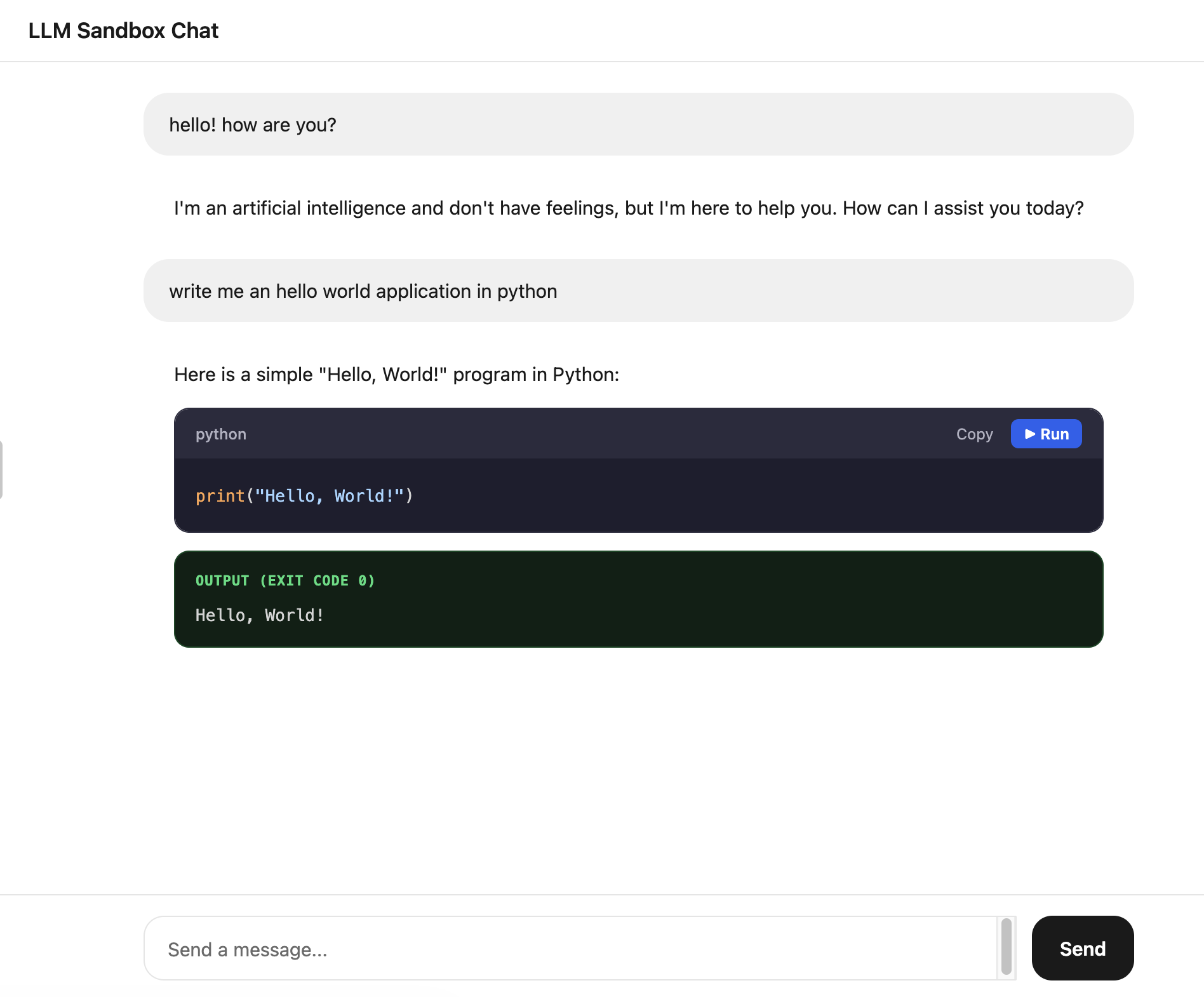
The Chat UI is a simple web interface for chatting with the AI model. When the model returns code, a Run button appears next to the code block so you can execute it in a sandbox and check the result — all from the same screen.
The LLM
The demo application needs an LLM that exposes an OpenAI-compatible API. You have two options:
-
Use any OpenAI-compatible endpoint (recommended) — set the following environment variables in the
agent-backendDeployment:env: - name: MODEL_NAME value: "granite-3-2-8b-instruct" # or any model your endpoint serves - name: LLM_API_URL value: "https://your-endpoint/v1" - name: LLM_API_KEY value: "your-api-key"This works with vLLM, LiteMaaS, OpenShift AI Model Serving, or any provider that exposes an OpenAI-compatible
/v1/chat/completionsendpoint. -
Use Google Vertex AI — if
LLM_API_URLis not set, the agent-backend falls back to the Vertex AI SDK using GCP credentials. See the demo repository README for details.
For more information on model configuration and deployment, refer to the Changing the Model section in the demo repository.
Two flows through the agent harness
The agent harness (agent-backend) handles two paths: a plain chat query, and code execution when the model returns runnable snippets.
Flow 1: Agent query (no sandbox)
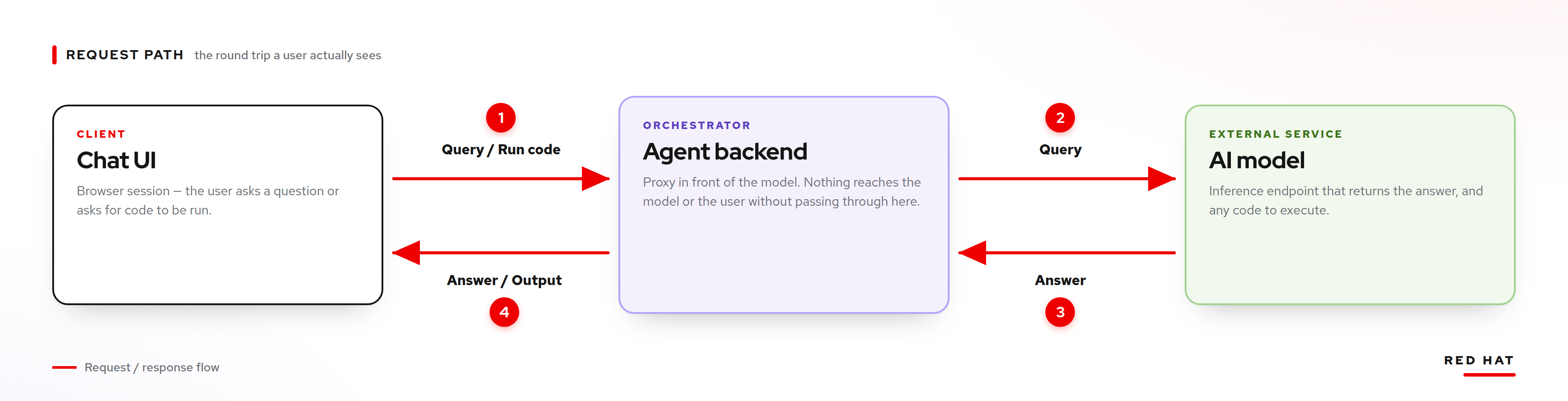
When you type a question in the chat UI, the message goes through the agent-backend directly to the AI model and the response is streamed back. No sandbox is involved — this is a simple chat interaction.
-
The user sends a query from the Chat UI.
-
The agent-backend forwards it to the AI model.
-
The AI model returns an answer.
-
The answer is streamed back to the Chat UI.
Flow 2: Code execution (with sandbox)
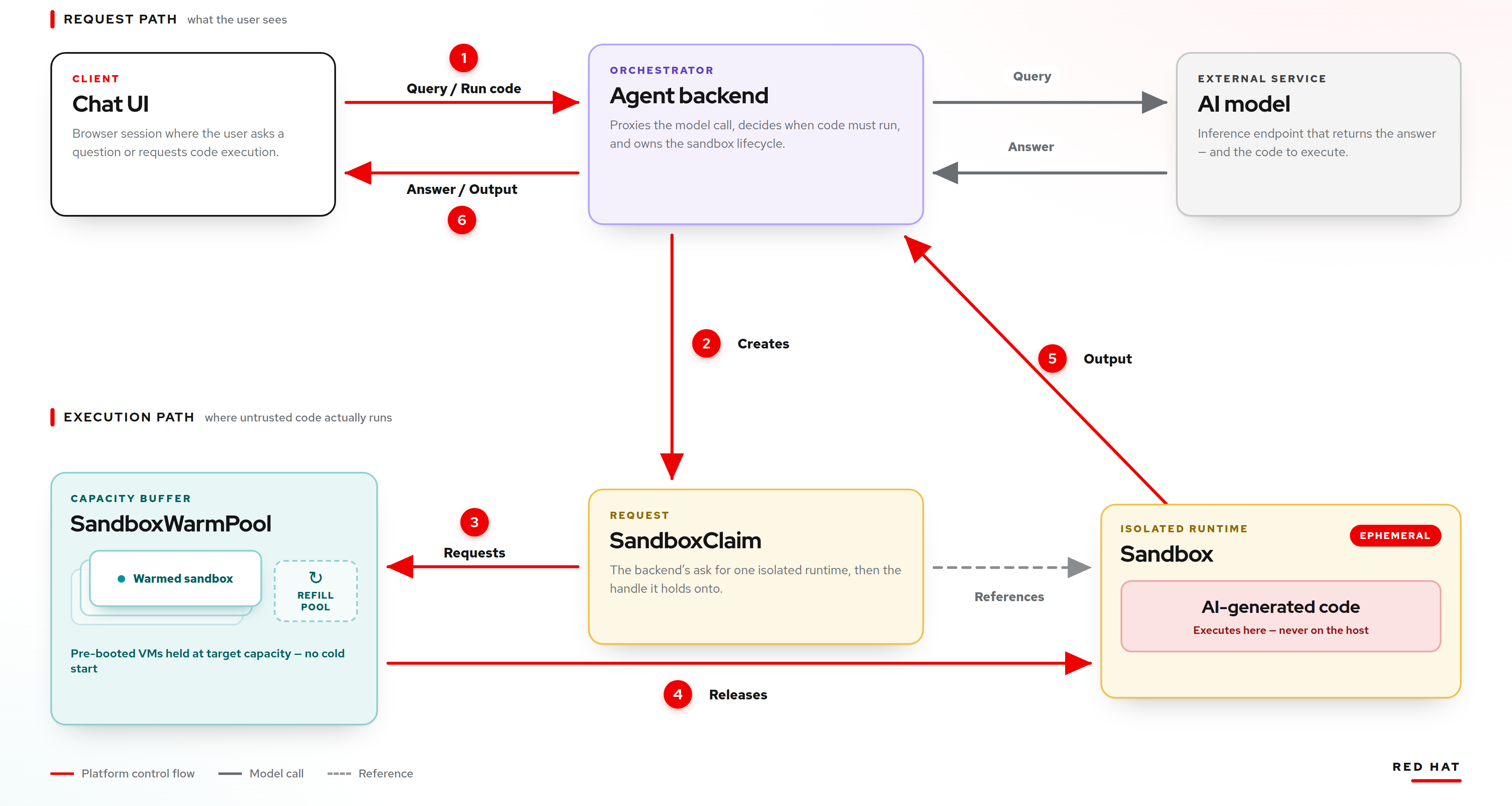
When the AI model generates code, a Run button appears next to the code block. Clicking it triggers sandbox-based execution:
-
The user clicks Run on a code block.
-
The agent-backend creates a
SandboxClaim. -
The claim requests a ready sandbox from the
SandboxWarmPool. -
The pool releases a
Sandboxand starts refilling. -
The code is sent to the sandbox pod for execution.
-
The output is returned to the Chat UI.
This is where the warm pool advantage is concretely visible: because sandboxes are pre-provisioned, code execution starts in milliseconds instead of waiting for a pod to be scheduled and started.
Why sandboxes?
Running AI-generated code raises immediate security questions. You are executing code that you did not write and may not have reviewed. Sandboxes provide:
-
Isolation: The code runs in a separate environment, away from your main workloads.
-
Speed: Thanks to the warm pool, there is no noticeable delay and the experience feels instant.
-
Disposability: Each sandbox is used once and discarded. No state leaks between executions.
However, as we will see in the prompt injection demo, the level of isolation depends entirely on the runtime. A standard runc container shares the host kernel with other pods on the same node. This is where OpenShift sandboxed containers (Kata Containers) comes in, but we will look at it later.
Source code
The full source code for this demo is available at llm-agent-sandbox-demo.