Attestation: key retrieval via initContainer
PERSONA: Application developer & Operational security expert
In this example, we will improve the sample-fraud-detection pod to also perform attestation.
We will do it by making the pod download a specific Azure blob storage that contains a pre-encrypted dataset.
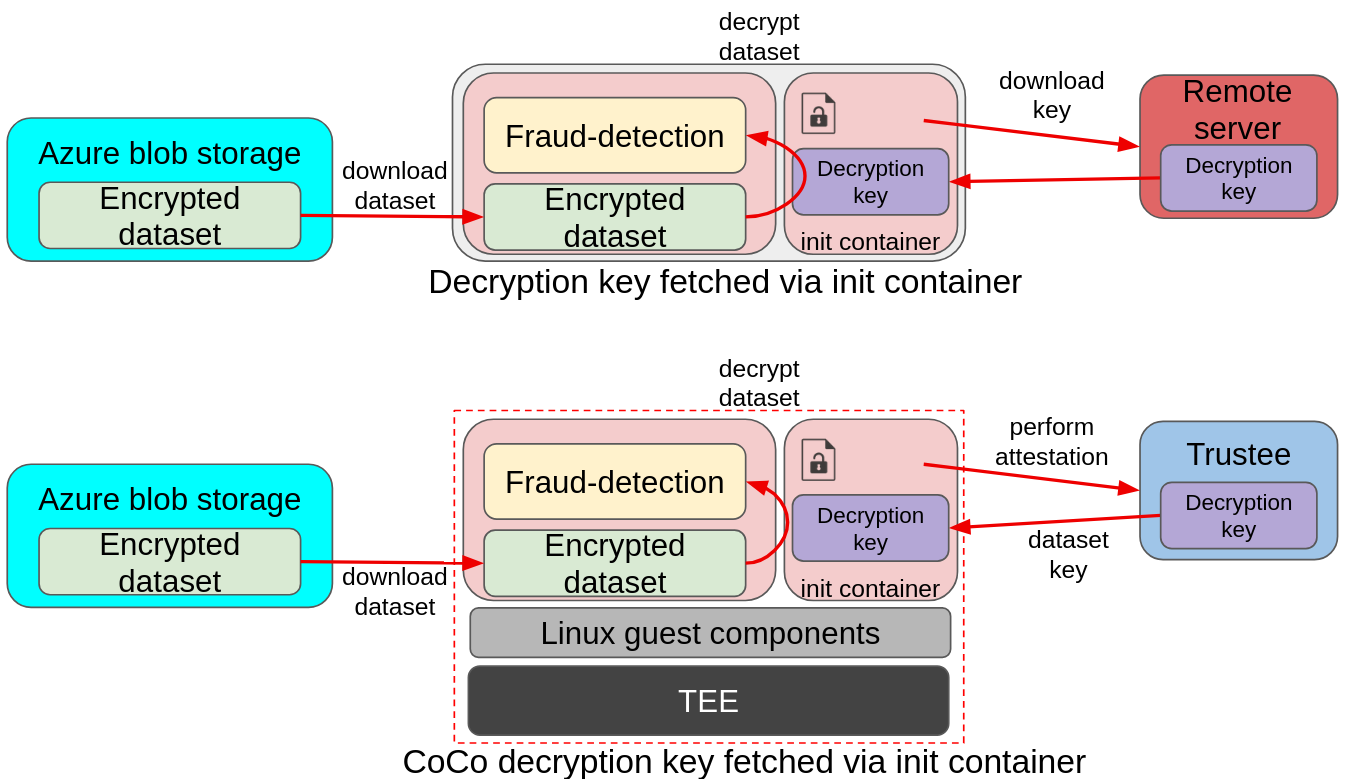
In the above image we can see a bit more advanced example of deployment. In the upper diagram, a pod is downloading an encrypted dataset from a remote Azure storage, and loading the decryption key via the init container from a separate remote server. The key is then used by the pod application to decrypt the dataset and feed it to the fraud detection model. The same deployment model also applies to CoCo, with the main difference being the introduction of the TEE stack to ensure data in use protection, and the remote server changing into the Red Hat build of Trustee. This ensures that the decryption key is only delivered to the fraud-detection pod if the environment is secure (attestation).
The Confidential Workflow
In this case, the application is told to fetch a key using the DECRYPTION_KEY_PATH env variable.
-
The fraud-detection container starts. Default initdata is also inserted in the CVM.
-
CoCo internal components read the initdata, notice there is an
image_security_policy_urifield in it and begins attestation to get the verification policy and verify that the image is allowed to run. -
The initcontainer starts, and performs attestation to fetch the required key from Trustee.
-
If attestation is successful, the key is stored in the shared volume mount.
-
-
The container then starts. It detects
DECRYPTION_KEY_PATHand expects to find the key (downloaded by the initcontainer) in the shared volume mount. -
Once the key is found, it proceeds downloading the encrypted dataset from Azure
-
The encrypted dataset is then decrypted using the downloaded key
-
The model then consumes the dataset and evaluates the transactions.
Add the application secret into Trustee
PERSONA: Operational security expert
Let’s add the decryption key into the Trustee. Here we are in the trusted cluster. As the encrypted dataset was already pre-uploaded and shared with you, we need to download the original key.
### dataset decryption key - application requires it
curl -L https://people.redhat.com/eesposit/fd-workshop-key.bin -o fd.bin
FD_SECRET_NAME=fraud-dataset
oc create secret generic $FD_SECRET_NAME \
  --from-file dataset_key=fd.bin \
  -n trustee-operator-system
rm -rf fd.bin
And then instruct Trustee to load that secret into its deployment, by updating the KbsConfig and restarting the Trustee deployment.
echo "Default Kbsconfig - kbsSecretResources:"
oc get kbsconfig trusteeconfig-kbs-config -n trustee-operator-system -o json \
  | jq '.spec.kbsSecretResources'

echo ""

oc patch kbsconfig trusteeconfig-kbs-config \
  -n trustee-operator-system \
  --type=json \
  -p="[
    {\"op\": \"add\", \"path\": \"/spec/kbsSecretResources/-\", \"value\": \"$FD_SECRET_NAME\"},
  ]"

echo ""

echo "Updated Kbsconfig - kbsSecretResources:"
oc get kbsconfig trusteeconfig-kbs-config -n trustee-operator-system -o json \
  | jq '.spec.kbsSecretResources'

oc rollout restart deployment/trustee-deployment -n trustee-operator-system
Run the application
PERSONA: Application developer
Let’s now run the decryption-fraud-detection application in the untrusted cluster.
Create and apply the yaml file.
cat > decryption-fd.yaml << EOF
apiVersion: v1
kind: Pod
metadata:
  name: decryption-fraud-detection
  namespace: default
spec:
  runtimeClassName: kata-remote
  initContainers:
    - name: fetch-secret
      image: quay.io/confidential-devhub/signed/fraud-detection:latest
      command:
      - /bin/sh
      - -c
      - |
        echo "Content of /app/downloaded_keys:"
        ls -l /app/downloaded_keys
        echo "Downloading key..."
        curl -sf http://localhost:8006/cdh/resource/default/fraud-dataset/dataset_key -o /app/downloaded_keys/dataset_key
        echo "Downloaded decryption key."
        echo "Content of /app/downloaded_keys:"
        ls -l /app/downloaded_keys
      volumeMounts:
        - name: downloaded-keys-volume
          mountPath: /app/downloaded_keys
  containers:
    - name: fraud-detection
      image: quay.io/confidential-devhub/signed/fraud-detection:latest
      env:
        - name: DECRYPTION_KEY_PATH
          value: /app/downloaded_keys/dataset_key
      securityContext:
        privileged: false
        allowPrivilegeEscalation: false
        runAsNonRoot: true
        runAsUser: 1001
        capabilities:
          drop:
            - ALL
        seccompProfile:
          type: RuntimeDefault
      volumeMounts:
        - name: downloaded-keys-volume
          mountPath: /app/downloaded_keys
  volumes:
    - name: downloaded-keys-volume
      emptyDir: {}
EOF

echo ""
cat decryption-fd.yaml
echo ""
Notice how we added a new fetch-secret initContainer, that ensures that the decryption key is fetched from the Trustee pod. The goal of this init container is to take care of performing the attestation, so that the main application logic does not need to be modified.
Notice how the curl call in the init container is connecting with http://127.0.0.1. This is done on purpose, because the CoCo technology is designed to avoid hardcoding any special logic into the container. This means that a Confidential Container doesn’t have to know where the Trustee lives, what is its ip, or even care about the attestation report. This is provided in the INITDATA, which in this case is the default given in the peer-pods configmap. Such url is then forwarded to the local Trustee agent running in side the CoCo Confidential VM automatically, so all the CoCo pod application has to do is communicate locally (therefore http is enough) with the local Trustee agent and ask for the path representing the secret it would like to get, in this case fraud-dataset/dataset_key. The Trustee agent will then take care of collecting hardware & software attestation proofs, create an attestation report, establish an https connection with the remote attester Trustee operator, and then perform the attestation process.
|
Let’s run the pod.
oc apply -f decryption-fd.yamlWait that the pod is created.
watch oc get pods/decryption-fraud-detection -n defaultThe pod is ready when the STATUS is in Running.
Because this pod also uses the default initdata, it will only be possible to inspect logs, but not to exec.
Verify the pod performed attestation
The only way to check that the pod is running as intended is to watch its logs. This time, the application should have found the key and downloaded the default Azure storage blob with the encrypted file.
oc logs pods/decryption-fraud-detection -c fraud-detection -n default | head -n 15Notice how the log is different this time:
#### Decryption key path set; downloading encrypted blob
  Downloading blob: data/dataset1.csv.enc
  No SAS token path set; using default SAS token
  Downloading Azure:///encrypteddatasets/data/dataset1.csv.enc -> /app/downloaded_datasets/dataset1.csv.enc
  Download complete

#### Loading data from /app/downloaded_datasets/
  Found an encrypted file: dataset1.csv.enc
  Decrypting: /app/downloaded_datasets/dataset1.csv.enc
    Before (head -n 1): Salted__-@d�dDb���<...
    After (head -n 1): distance_from_last_t...
  Loaded: /app/downloaded_datasets/dataset1.csv

Loaded 200000 transactions
Inspecting credit card transactions:
As you can see, the application did use the fetched key to decrypt the dataset and run.
Inspecting the fetch-secret initContainer, we see how that simple curl to localhost managed to get the key from Trustee.
oc logs pods/decryption-fraud-detection -c fetch-secret -n defaultContent of /app/downloaded_keys:
total 0
Downloading key...
Downloaded decryption key.
Content of /app/downloaded_keys:
total 4
-rw-r--r--. 1 root root 32 Feb 25 15:17 dataset_keyInspect Trustee
PERSONA: Operational security expert
It is also possible to inspect Trustee logs to understand how the process worked when the init container run.
POD_NAME=$(oc get pods -n trustee-operator-system -l app=kbs -o jsonpath='{.items[0].metadata.name}')

echo ""
oc logs -n trustee-operator-system "$POD_NAME"
Expected output (filtering the important logs only):
...
[2025-11-28T18:52:33Z INFO attestation_service] AzTdxVtpm Verifier/endorsement check passed.
...
[2025-11-28T18:52:33Z INFO actix_web::middleware::logger] 10.129.2.40 "GET /kbs/v0/resource/default/trustee-image-policy/policy HTTP/1.1" 200 850 "-" "attestation-agent-kbs-client/0.1.0" 0.001260

[2025-11-28T18:52:35Z INFO actix_web::middleware::logger] 10.129.2.40 "GET /kbs/v0/resource/default/conf-devhub-signature/pub-key HTTP/1.1" 200 629 "-" "attestation-agent-kbs-client/0.1.0" 0.001174

[2025-11-28T18:52:52Z INFO actix_web::middleware::logger] 10.128.2.73 "GET /kbs/v0/resource/default/fraud-dataset/dataset_key HTTP/1.1" 200 430 "-" "attestation-agent-kbs-client/0.1.0" 0.001094

...
In this formatted log, we can see how the AzSnpVtpm Verifier check passed, how the trustee-image-policy/policy policy for the image signature was requested and how subsequently the conf-devhub-signature/pub-key public key was fetched to ensure the signature is correct. Lastly, default/fraud-dataset/dataset_key was requested by our custom intcontainer.
Considerations
While the initcontainer/sidecar approach is valid in this example, such approach is mostly suggested to periodically trigger attestation to ensure the pod is in a safe state. This periodical-check sidecar approach is also called lazy attestation.
Here an example of a similar sidecar constantly checking for a secret. Note that the secret isn’t really used to do anything, the goal is just to successfully retrieve it:
[...]
containers:
  - name: attestation-checker
    image: registry.access.redhat.com/ubi9/ubi-minimal
    command:
      - /bin/sh
      - -c
      - |
        while true; do
          STATUS=$(curl -sf http://localhost:8006/cdh/resource/default/attestation-status/status || echo "error")
          if [ "$STATUS" != "success" ]; then
            echo "Attestation status FAILED: $STATUS"
            exit 1
          fi
          sleep 30
        done
[...]