Attestation: sealed secrets
PERSONA: Application developer and Operational security expert
Using initcontainer is a valid method to fetch a key, but it requires an additional sidecar to be loaded and additional unnecessary knowledge for the application developer, just to fetch the key.
Fortunately, CoCo offers an alternative way to fetch secrets which is more abstract and simplifies the life of the developer: sealed secrets.
In this example, we will replace the initcontainer with a sealed secret, so that the decryption key is automatically loaded at startup.
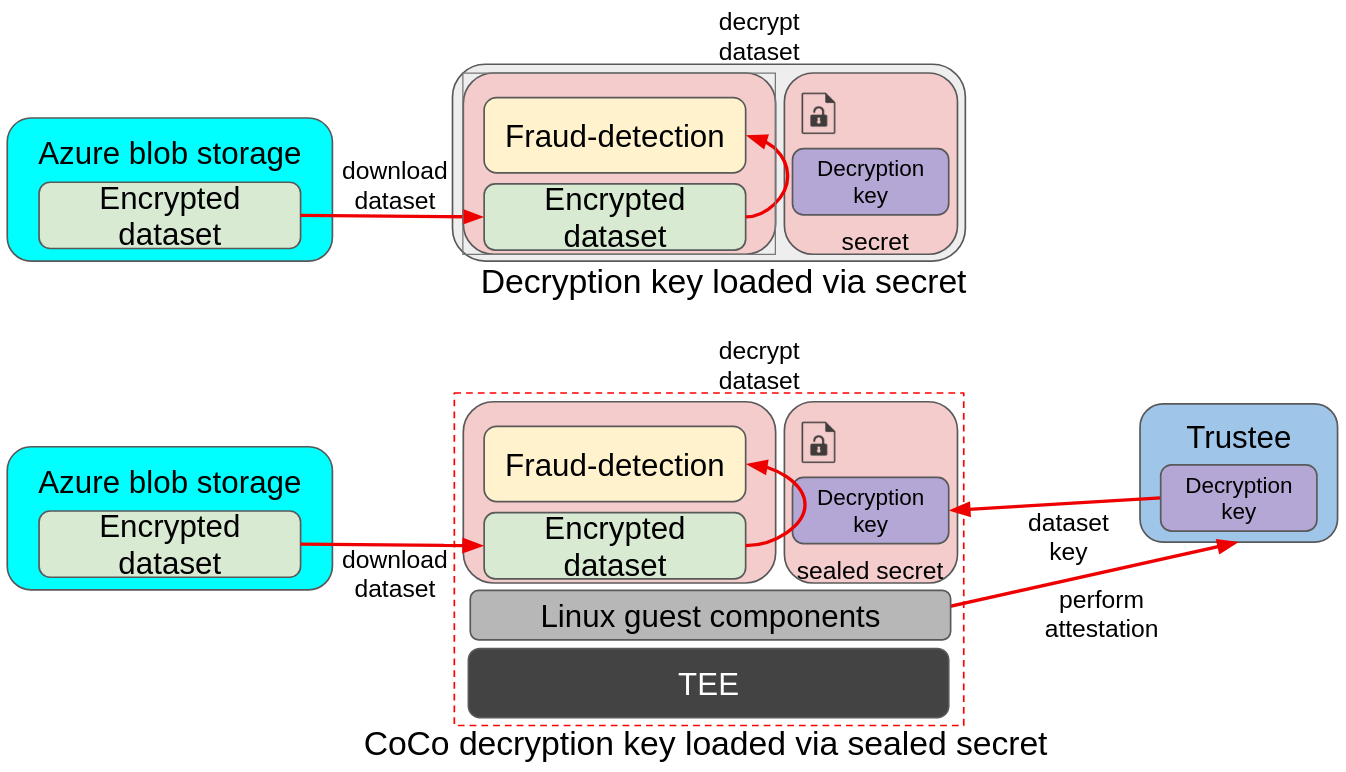
In the above image we can see a similar example as above, with the main difference being that there is no init container, and the key is instead mounted via a secret. While the traditional pod relies on the cluster secrets, which are available to anyone with admin access, CoCo uses sealed secrets, which gets automatically replaced with the actual secret by fetching the secret from Trustee at startup time. Such a process is automatically started by the Linux guest components inside the confidential container.
Sealed secrets
A sealed secret is an Openshift Secret added into the untrusted cluster, where the CoCo application runs, that doesn’t really contain any value but rather a "pointer" to the actual secret stored into Trustee, in the trusted cluster.
Once the CoCo pod starts, this sealed is inspected by the internal CoCo components, and the corresponding attestation and secret retrieval is automatically initiated with Trustee. If attestation is successful, the content of this "pointer" secret will be replaced with the actual secret, and mounted just like any other secret into the container.
The advantage of this approach is that:
-
the secret is loaded at startup time. No need of a sidecar or any special logic, the CoCo internal components take care of connecting with Trustee and fetching the actual value of the secret.
-
the secret is no different from a traditional openshift secret. While it requires an additional step to be created in the application namespace, this secret is no different from a traditional one, and can be accessed as volume by the pod. Trustee also supports loading secrets from Vault, using the External secrets operator, as explained in this blogpost
Sealed secrets are ideal to load credentials and sensitive data as traditional Secrets into the workload, without the need to add any sophisticated logic.
The Confidential Workflow
Also in this case, the application is told to fetch a key using the DECRYPTION_KEY_PATH env variable.
-
The fraud-detection container starts. Default initdata is also inserted in the CVM.
-
CoCo internal components read the initdata, notice there is an
image_security_policy_urifield in it and begins attestation to get the verification policy and verify that the image is allowed to run. -
Before the container starts, all secrets are mounted.
-
As we have a sealed secret, the CoCo internal components take care of performing attestation to fetch the actual secret value
-
The current sealed secret content is just a "pointer" that stores the path of the actual secret inside Trustee
-
Once attestation is successful and the actual secret is received, it’s mounted in the defined secret mount.
-
-
The container then starts. It detects
DECRYPTION_KEY_PATHand expects to find the key in the sealed secret volume mount (under/sealed/). -
Once the key is found, it proceeds downloading the encrypted dataset from Azure
-
The encrypted dataset is then decrypted using the downloaded key
-
The model then consumes the dataset and evaluates the transactions.
Add the application secrets into Trustee
In case you didn’t do it before, download the decryption key and upload it into the Trustee.
Generate the sealed-secret signing key
PERSONA: Operational security expert
As we saw, a sealed secret stored in the untrusted cluster is just a "pointer" to the real secret in Trustee. Because this pointer lives in the untrusted cluster, an attacker with cluster access could replace it with a different pointer — for example, one that redirects the application to fetch a different Trustee secret, or a secret from a malicious KBS endpoint entirely.
To prevent this, sealed secrets are signed using JWS (JSON Web Signature). The opsec expert signs each pointer with a private key, and uploads the corresponding public key to Trustee. When the CoCo components inside the CVM receive a sealed secret, they first fetch the public key from Trustee and verify the JWS signature. If the pointer was tampered with, the signature check fails and the secret is not unsealed.
We need a P-256 EC signing keypair (ES256 algorithm, JWK format): the private key stays on the bastion to sign sealed secrets, and the public key is uploaded to Trustee for verification.
mkdir -p $BASE_DIR/sealed-secrets
cd $BASE_DIR/sealed-secrets

pip install cryptography

# Generate P-256 EC keypair in JWK format
python3 -c "
from cryptography.hazmat.primitives.asymmetric import ec
import json, base64

key = ec.generate_private_key(ec.SECP256R1())
nums = key.private_numbers()
b64url = lambda n, l: base64.urlsafe_b64encode(n.to_bytes(l, 'big')).rstrip(b'=').decode()

jwk = {'kty':'EC','crv':'P-256','alg':'ES256','use':'sig','kid':'sealed-signing',
       'd': b64url(nums.private_value, 32),
       'x': b64url(nums.public_numbers.x, 32),
       'y': b64url(nums.public_numbers.y, 32)}

with open('sealed-signing-private.json','w') as f: json.dump(jwk, f, indent=2)
pub = {k:v for k,v in jwk.items() if k != 'd'}
with open('sealed-signing-public.json','w') as f: json.dump(pub, f, indent=2)
print('Generated sealed-signing-private.json and sealed-signing-public.json')
"

SIGNING_SECRET_NAME=sealed-signing-key
SIGNING_SECRET_FILE=jwk_public

oc create secret generic $SIGNING_SECRET_NAME \
    --from-file=$SIGNING_SECRET_FILE=./sealed-signing-public.json \
    -n trustee-operator-system

oc patch kbsconfig trusteeconfig-kbs-config \
  -n trustee-operator-system \
  --type=json \
  -p="[
    {\"op\": \"add\", \"path\": \"/spec/kbsSecretResources/-\", \"value\": \"$SIGNING_SECRET_NAME\"}
  ]"

oc rollout restart deployment/trustee-deployment -n trustee-operator-system

cd -
Create the sealed secret
PERSONA: Application developer
In order to create a sealed secret, we need to create this special secret into the untrusted cluster, in the namespace where the application will run.
Since we want to add a secret referencing the fraud-dataset/dataset_key Trustee secret created before, we will need to create the pointer first and then the actual secret.
Create the "pointer":
SECRET_NAME=fraud-dataset
KEY_NAME=dataset_key
SIGNING_SECRET_NAME=sealed-signing-key
SIGNING_SECRET_FILE=jwk_public

POINTER=$(podman run \
  -v $BASE_DIR/sealed-secrets/sealed-signing-private.json:/signing-key.json:Z \
  -i quay.io/openshift_sandboxed_containers/coco-tools:0.5.1 \
  secret seal \
  --signing-kid kbs:///default/$SIGNING_SECRET_NAME/$SIGNING_SECRET_FILE \
  --signing-jwk-path /signing-key.json \
  vault --resource-uri kbs:///default/${SECRET_NAME}/${KEY_NAME} --provider kbs | grep -v "Warning")

echo $POINTER
We can add this "pointer" to the CoCo container in multiple ways, either as secret/configmap, or as env variable. Since the application runs in the default namespace of the untrusted cluster, let’s add the secret there.
| Because this is stored/loaded in the untrusted OCP cluster, one might think that any attacker with cluster access could modify it. And while this is true, recall that this is just a pointer to the secret, and does not define the policy to access it nor the Trustee address. Which means that in the worst case this secret will point to a non-existing Trustee resource, or a valid but inaccessible resource, if Trustee policies are strict enough. |
# Note that the namespace here is "default"!
oc create secret generic fraud-dataset-sealed --from-literal=dataset_key=$POINTER -n default
That’s it! Now the application can load it as a normal Secret volume:
cat > sealed-fd.yaml << EOF
apiVersion: v1
kind: Pod
metadata:
  name: sealed-fraud-detection
  namespace: default
spec:
  runtimeClassName: kata-remote
  containers:
    - name: fraud-detection
      image: quay.io/confidential-devhub/signed/fraud-detection:latest
      env:
        - name: DECRYPTION_KEY_PATH
          value: /sealed/decryption/dataset_key
      securityContext:
        privileged: false
        allowPrivilegeEscalation: false
        runAsNonRoot: true
        runAsUser: 1001
        capabilities:
          drop:
            - ALL
        seccompProfile:
          type: RuntimeDefault
      volumeMounts:
          - name: decryption-key
            mountPath: "/sealed/decryption"
  volumes:
    - name: decryption-key
      secret:
        secretName: fraud-dataset-sealed
EOF

echo ""
cat sealed-fd.yaml
echo ""
And the container will find the content of fraud-dataset/dataset_key in /sealed/decryption/dataset_key!
Sealed secret volumes must be mounted under the /sealed directory for CDH to recognize and unseal them. See the CoCo sealed secrets documentation for details.
|
Alternatively, this pointer can also be also directly plugged in the podspec as environment variable:
[...]
env:
   - name: MY_VARIABLE
   - value: $POINTER
[...]
And $MY_VARIABLE will contain the content of fraud-dataset/dataset_key!
Let’s run the pod.
oc apply -f sealed-fd.yamlWait that the pod is created.
watch oc get pods/sealed-fraud-detection -n defaultThe pod is ready when the STATUS is in Running.
Because this pod also uses the default initdata, it will only be possible to inspect logs, but not to exec.
Verify the pod performed attestation
The only way to check that the pod is running as intended is to watch its logs. This time, the application should have found the key and downloaded the default Azure storage blob with the encrypted file.
oc logs pods/sealed-fraud-detection -n default | head -n 15Notice how the log is exactly the same as in the key retrieval pod, but this time we didn’t need the initcontainer:
#### Decryption key path set; downloading encrypted blob
  Downloading blob: data/dataset1.csv.enc
  No SAS token path set; using default SAS token
  Downloading Azure:///encrypteddatasets/data/dataset1.csv.enc -> /app/downloaded_datasets/dataset1.csv.enc
  Download complete

#### Loading data from /app/downloaded_datasets/
  Found an encrypted file: dataset1.csv.enc
  Decrypting: /app/downloaded_datasets/dataset1.csv.enc
    Before (head -n 1): Salted__-@d�dDb���<...
    After (head -n 1): distance_from_last_t...
  Loaded: /app/downloaded_datasets/dataset1.csv

Loaded 200000 transactions
Inspecting credit card transactions:Inspect Trustee
PERSONA: Operational security expert
Trustee logs will also show the same story as the workload:
POD_NAME=$(oc get pods -n trustee-operator-system -l app=kbs -o jsonpath='{.items[0].metadata.name}')

echo ""
oc logs -n trustee-operator-system "$POD_NAME"
...
[2025-11-28T18:52:33Z INFO attestation_service] AzTdxVtpm Verifier/endorsement check passed.
...
[2025-11-28T18:52:33Z INFO actix_web::middleware::logger] 10.129.2.40 "GET /kbs/v0/resource/default/trustee-image-policy/policy HTTP/1.1" 200 850 "-" "attestation-agent-kbs-client/0.1.0" 0.001260
[2025-11-28T18:52:35Z INFO actix_web::middleware::logger] 10.129.2.40 "GET /kbs/v0/resource/default/conf-devhub-signature/pub-key HTTP/1.1" 200 629 "-" "attestation-agent-kbs-client/0.1.0" 0.001174
[2025-11-28T18:52:52Z INFO actix_web::middleware::logger] 10.128.2.73 "GET /kbs/v0/resource/default/fraud-dataset/dataset_key HTTP/1.1" 200 430 "-" "attestation-agent-kbs-client/0.1.0" 0.001094
...