Restrict resource access in Trustee
PERSONA: Application developer & Operational security expert
So far, for semplicity we always allowed all pods to be able to access the same Trustee resources.
However, in a production environment, this is never the case. We want to restrict pods to be able to have their own their own secrets.
In this example, we will only allow a single pod to be able to fetch the decryption key to decrypt the dataset, while the others will fail to get it, despite running in a secure CoCo environment too.
In order to achieve that we will again leverage custom initdata policies, and insert them into the pod via initdata annotation.
In this example, we will have three example pods:
-
pod1can only access the secretp1-secret/dataset_key -
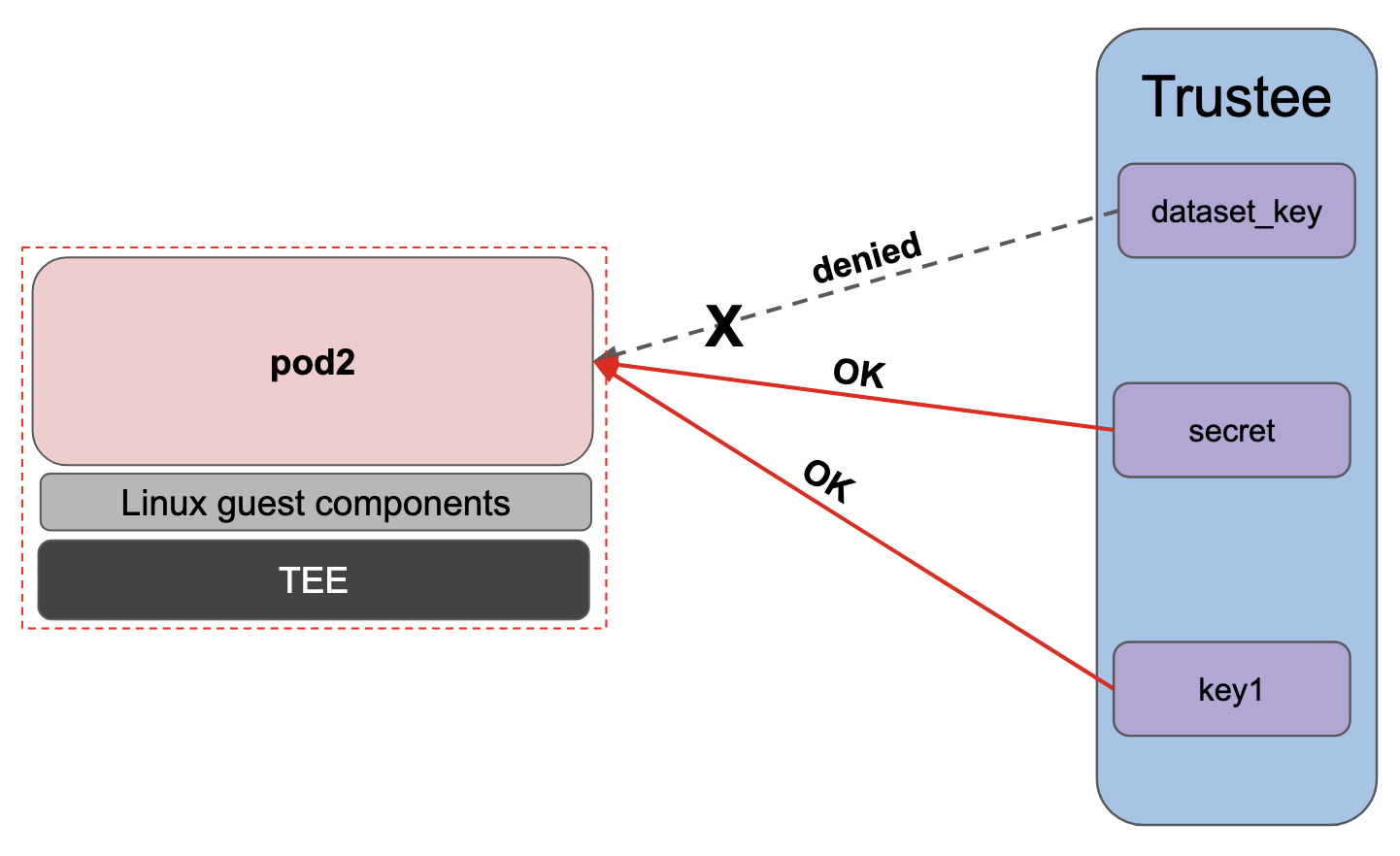
pod2can only access the secretp2-secret/secret -
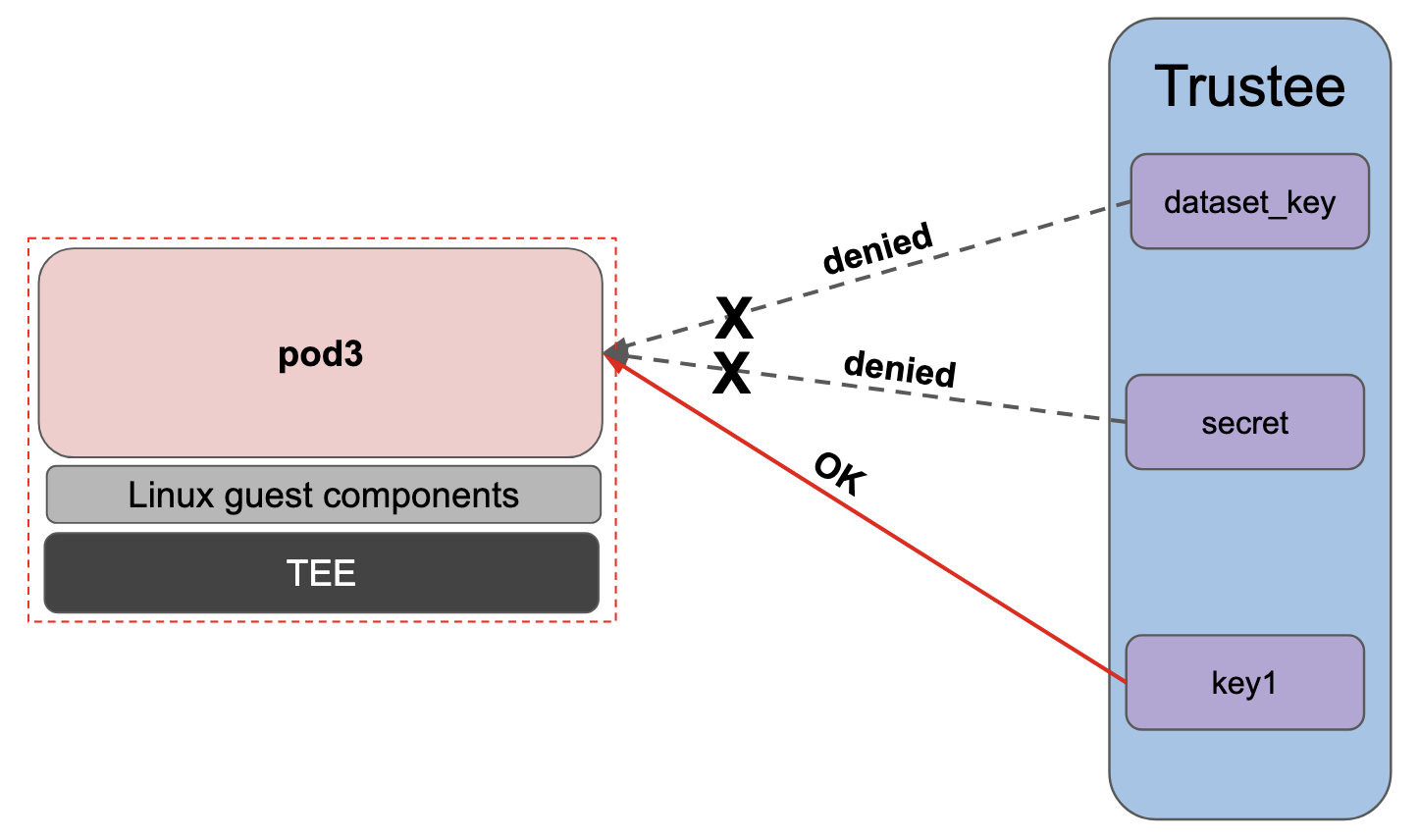
pod3can access any other secret except forp1-secretandp2-secret.
All three pods will have the same restrictions: logs enabled, exec restricted to only curl p1-secret/dataset_key, curl p2-secret/secret and curl attestation-status/status.
After Trustee is configured, we will see that if we try to access p1-secret with pod2 or pod3, the attestation check will be succesful but the resource access policy will deny its access.
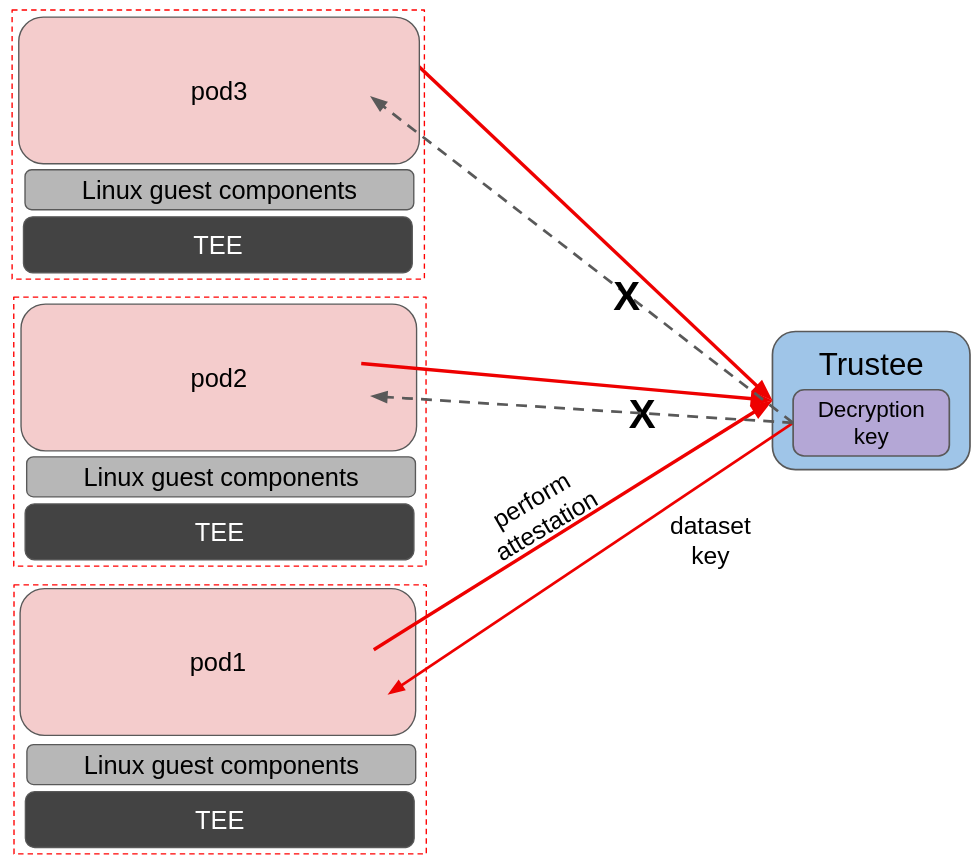
In the above image we see an example of resource access restriction. All three pods want to try and fetch the decryption key stored in Trustee (p1-secret/dataset_key), but only pod1 manages to do so.
Note that for this example, the actual workload is not really important, therefore to keep things as simple as possible, we will use the CoCo pod with default settings deployment example for all three pods, and fetch the secrets manually via exec.
PERSONA: Operational security expert
Before we start
In order to recreate the correct initdata we need $TRUSTEE_HOST, $TRUSTEE_CERT and $POLICY_SECRET_NAME/$POLICY_SECRET_FILE.
If you lost these variables, they can be fetched using the following command:
POLICY_SECRET_NAME=trustee-image-policy
POLICY_SECRET_FILE=policy

TRUSTEE_HOST="https://$(oc get route -n trustee-operator-system kbs-route \
  -o jsonpath={.spec.host})"

TRUSTEE_CERT=$(oc get secret trustee-tls-cert -n trustee-operator-system -o json | jq -r '.data."tls.crt"' | base64 --decode)
Create the pod secrets
Let’s create a dummy secret for pod1 and pod2:
oc create secret generic p1-secret \
  --from-literal dataset_key="Pod 1 secret!" \
  -n trustee-operator-system

oc create secret generic p2-secret \
  --from-literal secret="Pod 2 secret!" \
  -n trustee-operator-system
Add it into Trustee:
oc patch kbsconfig trusteeconfig-kbs-config \
  -n trustee-operator-system \
  --type=json \
  -p="[
    {\"op\": \"add\", \"path\": \"/spec/kbsSecretResources/-\", \"value\": \"p1-secret\"},
    {\"op\": \"add\", \"path\": \"/spec/kbsSecretResources/-\", \"value\": \"p2-secret\"},
  ]"

echo ""

echo "Updated Kbsconfig - kbsSecretResources:"
oc get kbsconfig trusteeconfig-kbs-config -n trustee-operator-system -o json \
  | jq '.spec.kbsSecretResources'
You should see p1-secret and p2-secret.
Create the custom initdata policies
The major difference here is that we will define a new custom variable in our initdata, namely pod_name =, to distinguish one initdata from the other. Adding such a simple change to differentiate the initdatas is enough as they are measured and part of the reference values.
Pod 1
Let’s create initdata for pod1.
cat > initdata-pod1.toml <<EOF
algorithm = "sha256"
version = "0.1.0"
pod_name = "pod1"

[data]
"aa.toml" = '''
[token_configs]
[token_configs.coco_as]
url = "${TRUSTEE_HOST}"

[token_configs.kbs]
url = "${TRUSTEE_HOST}"
cert = """
${TRUSTEE_CERT}
"""
'''

"cdh.toml"  = '''
socket = 'unix:///run/confidential-containers/cdh.sock'
credentials = []

[kbc]
name = "cc_kbc"
url = "${TRUSTEE_HOST}"
kbs_cert = """
${TRUSTEE_CERT}
"""

[image]
image_security_policy_uri = 'kbs:///default/$POLICY_SECRET_NAME/$POLICY_SECRET_FILE'
'''

"policy.rego" = '''
package agent_policy

import future.keywords.in
import future.keywords.if

default AddARPNeighborsRequest := true
default AddSwapRequest := true
default CloseStdinRequest := true
default CopyFileRequest := true
default CreateContainerRequest := true
default CreateSandboxRequest := true
default DestroySandboxRequest := true
default GetMetricsRequest := true
default GetOOMEventRequest := true
default GuestDetailsRequest := true
default ListInterfacesRequest := true
default ListRoutesRequest := true
default MemHotplugByProbeRequest := true
default OnlineCPUMemRequest := true
default PauseContainerRequest := true
default PullImageRequest := true
default RemoveContainerRequest := true
default RemoveStaleVirtiofsShareMountsRequest := true
default ReseedRandomDevRequest := true
default ResumeContainerRequest := true
default SetGuestDateTimeRequest := true
default SetPolicyRequest := false
default SignalProcessRequest := true
default StartContainerRequest := true
default StartTracingRequest := true
default StatsContainerRequest := true
default StopTracingRequest := true
default TtyWinResizeRequest := true
default UpdateContainerRequest := true
default UpdateEphemeralMountsRequest := true
default UpdateInterfaceRequest := true
default UpdateRoutesRequest := true
default WaitProcessRequest := true
default WriteStreamRequest := false

# Enable logs
default ReadStreamRequest := true

# Restrict exec
default ExecProcessRequest := false

ExecProcessRequest if {
    input_command = concat(" ", input.process.Args)
    some allowed_command in policy_data.allowed_commands
    input_command == allowed_command
}

# Add allowed commands for exec
policy_data := {
  "allowed_commands": [
        "curl -s http://127.0.0.1:8006/cdh/resource/default/p1-secret/dataset_key",
        "curl -s http://127.0.0.1:8006/cdh/resource/default/p2-secret/secret",
        "curl -s http://127.0.0.1:8006/cdh/resource/default/attestation-status/status",
  ]
}

'''
EOF
Let’s inspect the changes:
echo ""
cat initdata-pod1.toml | head -n 4
echo ""
As mentioned above, we are introducing the pod_name = "pod1" variable.
algorithm = "sha256"
version = "0.1.0"
pod_name = "pod1"
cat initdata-pod1.toml | tail -n 23
echo ""Second, we enabled logs, and restricted exec to just try to pull p1-secret, p2-secret and the default attestation-status.
# Enable logs
default ReadStreamRequest := true

# Restrict exec
default ExecProcessRequest := false

ExecProcessRequest if {
    input_command = concat(" ", input.process.Args)
    some allowed_command in policy_data.allowed_commands
    input_command == allowed_command
}

# Add allowed commands for exec
policy_data := {
  "allowed_commands": [
        "curl -s http://127.0.0.1:8006/cdh/resource/default/p1-secret/dataset_key",
        "curl -s http://127.0.0.1:8006/cdh/resource/default/p2-secret/secret",
        "curl -s http://127.0.0.1:8006/cdh/resource/default/attestation-status/status",
  ]
}

'''
Now, let’s calculate the pcr8 for this policy:
initial_pcr=0000000000000000000000000000000000000000000000000000000000000000
hash=$(sha256sum initdata-pod1.toml | cut -d' ' -f1)
PCR8_HASH_P1=$(echo -n "$initial_pcr$hash" | xxd -r -p | sha256sum | cut -d' ' -f1)
echo ""
echo "PCR 8 POD1:" $PCR8_HASH_P1
Pod 2
Now let’s do the same for pod 2. This pod will have the same initdata, the only difference being that it has pod_name = "pod2".
Instead of rewriting it, let’s copy initdata-pod1.toml and change the name:
cp initdata-pod1.toml initdata-pod2.toml
sed -i 's/^pod_name = "pod1"/pod_name = "pod2"/' "initdata-pod2.toml"

echo ""

diff initdata-pod1.toml initdata-pod2.toml
We can see the only difference between the two initdata is the pod name variable.
< pod_name = "pod1"
---
> pod_name = "pod2"
Let’s get the pcr8 of this policy too:
initial_pcr=0000000000000000000000000000000000000000000000000000000000000000
hash=$(sha256sum initdata-pod2.toml | cut -d' ' -f1)
PCR8_HASH_P2=$(echo -n "$initial_pcr$hash" | xxd -r -p | sha256sum | cut -d' ' -f1)
echo ""
echo "PCR 8 POD2:" $PCR8_HASH_P2
Pod 3
Do the same with pod 3, the only difference being that it has pod_name = "pod3".
Let’s copy initdata-pod1.toml and change the name:
cp initdata-pod1.toml initdata-pod3.toml
sed -i 's/^pod_name = "pod1"/pod_name = "pod3"/' "initdata-pod3.toml"

echo ""

diff initdata-pod1.toml initdata-pod3.toml
We can see the only difference between the two initdata is the pod name variable.
< pod_name = "pod1"
---
> pod_name = "pod3"
Let’s get the pcr8 of this policy too:
initial_pcr=0000000000000000000000000000000000000000000000000000000000000000
hash=$(sha256sum initdata-pod3.toml | cut -d' ' -f1)
PCR8_HASH_P3=$(echo -n "$initial_pcr$hash" | xxd -r -p | sha256sum | cut -d' ' -f1)
echo ""
echo "PCR 8 POD3:" $PCR8_HASH_P3
Update the resource access policy
Now we need to tell Trustee to "return p1-secret to this (pod1) initdata, p2-secret to this other (pod2) initdata, and none of them to any other initdata".
We will use a custom resource access policy to do so. A default resource policy is already created by the Trusteeconfig, and it simply allows any pod to access any secret. Therefore we need to extend it with a more complex logic.
For more information about resource access policies, and how to create stronger ones, look here.
Let’s inspect what is currently there:
oc get configmap trusteeconfig-resource-policy \
  -n trustee-operator-system \
  -o jsonpath='{.data.resource-policy\.rego}'
As you can see, it just checks that the pod to attest has a TEE.
Let’s implement a better policy:
cat > custom-resourcepolicy.rego <<EOF
package policy
import rego.v1
default allow = false
default hardware_failing = false

basic_checks if {
    count(input.submods) > 0
    not executable_failing
    not configuration_failing
    not hardware_failing
}

executable_failing if {
    some _, submod in input.submods
    executables := submod["ear.trustworthiness-vector"]["executables"]
    not in_affirming_range(executables)
}

configuration_failing if {
    some _, submod in input.submods
    configuration := submod["ear.trustworthiness-vector"]["configuration"]
    not in_affirming_range(configuration)
}

# Hardware trust claims are enforced by default. For TDX, no additional
# RVPS values are needed. For SNP, you must provide hardware-specific
# RVPS values (tcb_bootloader, tcb_microcode, tcb_snp, tcb_tee) from
# your environment. If these values are not available, comment out
# the following block.
hardware_failing if {
   some _, submod in input.submods
   hardware := submod["ear.trustworthiness-vector"]["hardware"]
   not in_affirming_range(hardware)
}

in_affirming_range(val) if {
    val >= 2
    val <= 31
}

init_data_pod1 := "$PCR8_HASH_P1"
init_data_pod2 := "$PCR8_HASH_P2"

path := data["resource-path"]

is_ps1 if {
  count(path) > 2
  path[1] == "p1-secret"
}

is_ps2 if {
  count(path) > 2
  path[1] == "p2-secret"
}

allow if {
  is_ps1
  basic_checks
  input["submods"]["cpu0"]["ear.status"] == "affirming"
  input["submods"]["cpu0"]["ear.veraison.annotated-evidence"]["init_data"] == init_data_pod1
}
allow if {
  is_ps2
  basic_checks
  input["submods"]["cpu0"]["ear.status"] == "affirming"
  input["submods"]["cpu0"]["ear.veraison.annotated-evidence"]["init_data"] == init_data_pod2
}
allow if {
  not is_ps1
  not is_ps2
  basic_checks
  input["submods"]["cpu0"]["ear.status"] == "affirming"
}
EOF

echo ""
cat custom-resourcepolicy.rego
echo ""
In this policy, we first try to understand if the request is coming for the p1 or p2 secret (is_p1 and is_p2). Then we check the initdata refvals to match the defined ones if the request is about accessing these specific ones. On the other side, if the request is for any other secret, let’s just allow it.
|
This policy is always triggered, meaning also when the image signature policy is requested, such policy is executed to check if it can be returned or not. This allows for complex access policies that can also restrict the image signature verification. |
And now let’s apply the policy:
oc create configmap trusteeconfig-resource-policy \
  -n trustee-operator-system \
  --from-file=resource-policy.rego=custom-resourcepolicy.rego \
  --dry-run=client -o yaml \
| oc apply -f -

echo ""

oc get configmap trusteeconfig-resource-policy \
  -n trustee-operator-system \
  -o jsonpath='{.data.resource-policy\.rego}'
Update the reference values
As last step, we need to update the reference values to also accept the two new pcr8 values:
oc get configmap trusteeconfig-rvps-reference-values \
  -n trustee-operator-system -o json \
| jq --arg p1 "$PCR8_HASH_P1" \
     --arg p2 "$PCR8_HASH_P2" \
     --arg p3 "$PCR8_HASH_P3" '
  .data.reference_value |= (
    fromjson
    | with_entries(
        if (.key | test("^(snp|tdx)_pcr08$"))
        then .value |= (
          @base64d | fromjson
          | .value += [$p1, $p2, $p3]
          | tojson | @base64
        )
        else .
        end
      )
    | tojson
  )
  | del(.metadata.resourceVersion)
' \
| oc replace -f -

echo ""

oc get configmap trusteeconfig-rvps-reference-values \
  -n trustee-operator-system \
  -o jsonpath='{.data.reference_value}' \
| jq 'map_values(@base64d | fromjson)'
Apply the changes by restarting the Trustee deployment
Simply restart the deployment to allow the Trustee pod to pick the new resource secrets, resource policies, and reference values.
oc rollout restart deployment/trustee-deployment -n trustee-operator-systemPrepare the podspec
PERSONA: Application developer
We will run 3 pods: pod1, pod2 and a pod3 that should not be allowed to access any of the two secrets. Again, the image is the usual fraud-detection, even though we don’t really care about the workload now.
INITDATA_POD1=$(cat initdata-pod1.toml | gzip | base64 -w0)
echo ""
echo $INITDATA_POD1

cat > pod1.yaml << EOF
apiVersion: v1
kind: Pod
metadata:
  name: pod1
  namespace: default
  annotations:
    io.katacontainers.config.hypervisor.machine_type: Standard_DC2as_v5
    io.katacontainers.config.hypervisor.cc_init_data: "$INITDATA_POD1"
spec:
  runtimeClassName: kata-remote
  containers:
    - name: fraud-detection
      image: quay.io/confidential-devhub/signed/fraud-detection:latest
      securityContext:
        privileged: false
        allowPrivilegeEscalation: false
        runAsNonRoot: true
        runAsUser: 1001
        capabilities:
          drop:
            - ALL
        seccompProfile:
          type: RuntimeDefault
EOF

echo ""
cat pod1.yaml
echo ""
INITDATA_POD2=$(cat initdata-pod2.toml | gzip | base64 -w0)
echo ""
echo $INITDATA_POD2
cat > pod2.yaml << EOF
apiVersion: v1
kind: Pod
metadata:
name: pod2
namespace: default
annotations:
io.katacontainers.config.hypervisor.machine_type: Standard_DC2as_v5
io.katacontainers.config.hypervisor.cc_init_data: "$INITDATA_POD2"
spec:
runtimeClassName: kata-remote
containers:
- name: fraud-detection
image: quay.io/confidential-devhub/signed/fraud-detection:latest
securityContext:
privileged: false
allowPrivilegeEscalation: false
runAsNonRoot: true
runAsUser: 1001
capabilities:
drop:
- ALL
seccompProfile:
type: RuntimeDefault
EOF
echo ""
cat pod2.yaml
echo ""INITDATA_POD3=$(cat initdata-pod3.toml | gzip | base64 -w0)
echo ""
echo $INITDATA_POD3
cat > pod3.yaml << EOF
apiVersion: v1
kind: Pod
metadata:
name: pod3
namespace: default
annotations:
io.katacontainers.config.hypervisor.machine_type: Standard_DC2as_v5
io.katacontainers.config.hypervisor.cc_init_data: "$INITDATA_POD3"
spec:
runtimeClassName: kata-remote
containers:
- name: fraud-detection
image: quay.io/confidential-devhub/signed/fraud-detection:latest
securityContext:
privileged: false
allowPrivilegeEscalation: false
runAsNonRoot: true
runAsUser: 1001
capabilities:
drop:
- ALL
seccompProfile:
type: RuntimeDefault
EOF
echo ""
cat pod3.yaml
echo ""Notice how we also added a custom machine_type: Standard_DC2as_v5 annotation. This is simply done to ensure we comply with eventual quota limitation on Azure.
Run the pods and verify
Let’s now run the pods, and verify they work as intended.
oc apply -f pod1.yaml
oc apply -f pod2.yaml
oc apply -f pod3.yaml
Wait that the pod are created.
watch -n 2 "oc get pod pod1 pod2 pod3 -n default"Let’s now try if the policies are enforced:
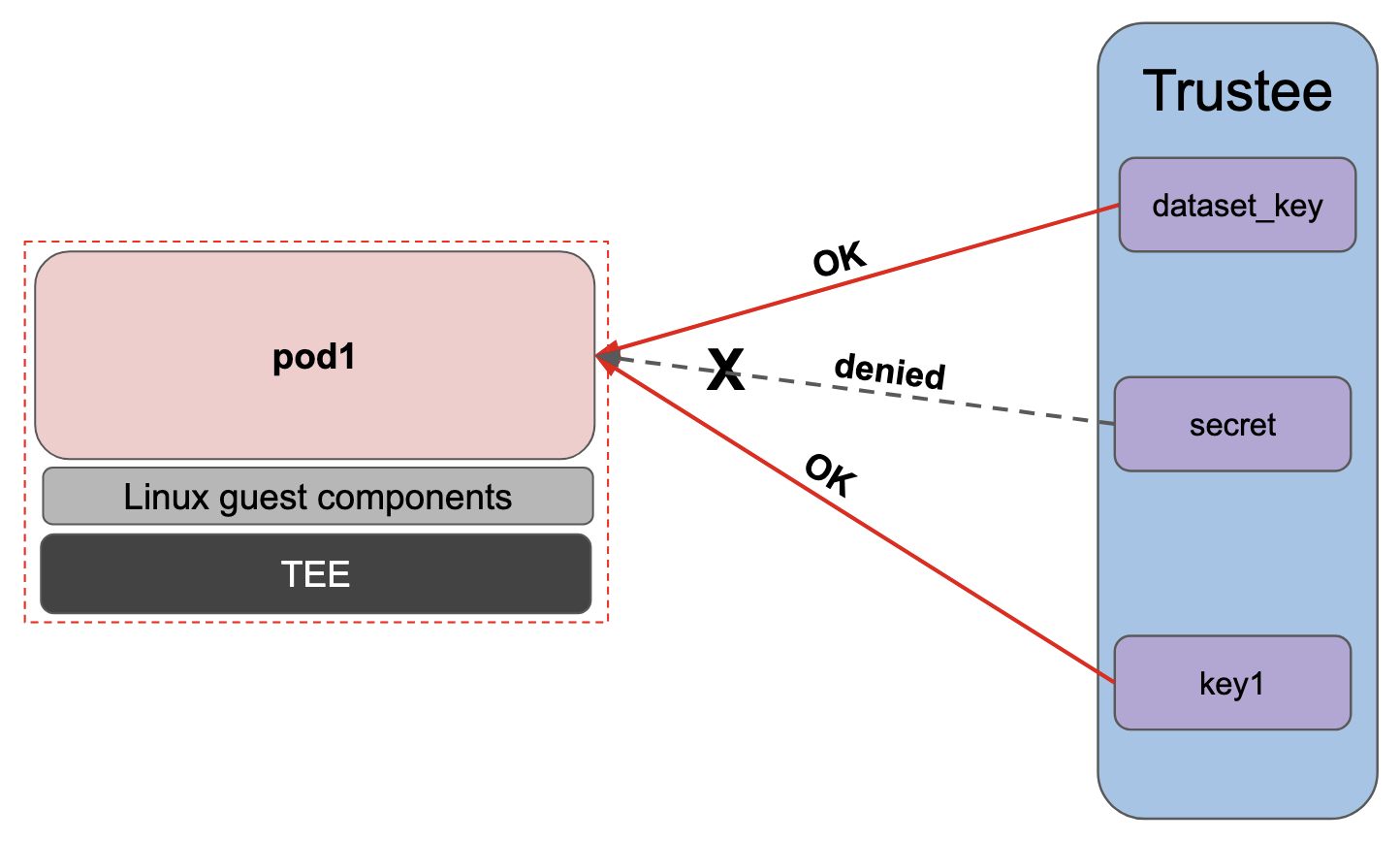
-
pod1can accessp1-secret/dataset_keyoc exec -it pods/pod1 -n default -- curl -s http://127.0.0.1:8006/cdh/resource/default/p1-secret/dataset_key && echo ""[azure@bastion ~]# oc exec -it pods/pod1 -n default -- curl -s http://127.0.0.1:8006/cdh/resource/default/p1-secret/dataset_key && echo "" Pod 1 secret! -
pod1cannot accessp2-secret/secretoc exec -it pods/pod1 -n default -- curl -s http://127.0.0.1:8006/cdh/resource/default/p2-secret/secret && echo ""[azure@bastion ~]# oc exec -it pods/pod1 -n default -- curl -s http://127.0.0.1:8006/cdh/resource/default/p2-secret/secret && echo "" rpc status: Status { code: INTERNAL, message: "[CDH] [ERROR]: Get Resource failed", details: [], special_fields: SpecialFields { unknown_fields: UnknownFields { fields: None }, cached_size: CachedSize { size: 0 } } }In the Trustee logs, the policy deny error is visible:
POD_NAME=$(oc get pods -n trustee-operator-system -l app=kbs -o jsonpath='{.items[0].metadata.name}')

echo ""
oc logs -n trustee-operator-system "$POD_NAME"
[...] [2026-02-25T11:02:01Z ERROR kbs::error] PolicyDeny [2026-02-25T11:02:01Z INFO actix_web::middleware::logger] 10.129.2.9 "GET /kbs/v0/resource/default/p2-secret/secret HTTP/1.1" 401 110 "-" "attestation-agent-kbs-client/0.1.0" 0.000695 [2026-02-25T11:02:03Z INFO actix_web::middleware::logger] 10.129.2.9 "POST /kbs/v0/auth HTTP/1.1" 200 74 "-" "attestation-agent-kbs-client/0.1.0" 0.000073 [2026-02-25T11:02:03Z INFO attestation_service] AzSnpVtpm Verifier/endorsement check passed. [2026-02-25T11:02:03Z INFO actix_web::middleware::logger] 10.129.2.9 "POST /kbs/v0/attest HTTP/1.1" 200 5077 "-" "attestation-agent-kbs-client/0.1.0" 0.002771 -
pod1can accessattestation-status/statusoc exec -it pods/pod1 -n default -- curl -s http://127.0.0.1:8006/cdh/resource/default/attestation-status/status && echo ""[azure@bastion ~]# oc exec -it pods/pod1 -n default -- curl -s http://127.0.0.1:8006/cdh/resource/default/attestation-status/status && echo "" resval1
Same logic applies to pod2
-
pod2cannot accessp1-secret/dataset_keyoc exec -it pods/pod2 -n default -- curl -s http://127.0.0.1:8006/cdh/resource/default/p1-secret/dataset_key && echo ""[azure@bastion ~]# oc exec -it pods/pod2 -n default -- curl -s http://127.0.0.1:8006/cdh/resource/default/p1-secret/dataset_key && echo "" rpc status: Status { code: INTERNAL, message: "[CDH] [ERROR]: Get Resource failed", details: [], special_fields: SpecialFields { unknown_fields: UnknownFields { fields: None }, cached_size: CachedSize { size: 0 } } } -
pod2can accessp2-secret/secretoc exec -it pods/pod2 -n default -- curl -s http://127.0.0.1:8006/cdh/resource/default/p2-secret/secret && echo ""[azure@bastion ~]# oc exec -it pods/pod2 -n default -- curl -s http://127.0.0.1:8006/cdh/resource/default/p2-secret/secret && echo "" Pod 2 secret! -
pod2can accessattestation-status/statusoc exec -it pods/pod2 -n default -- curl -s http://127.0.0.1:8006/cdh/resource/default/attestation-status/status && echo ""[azure@bastion ~]# oc exec -it pods/pod2 -n default -- curl -s http://127.0.0.1:8006/cdh/resource/default/attestation-status/status && echo "" resval1
The interesting part comes with pod3
-
pod3cannot accessp1-secret/dataset_keyoc exec -it pods/pod3 -n default -- curl -s http://127.0.0.1:8006/cdh/resource/default/p1-secret/dataset_key && echo ""[azure@bastion ~]# oc exec -it pods/pod3 -n default -- curl -s http://127.0.0.1:8006/cdh/resource/default/p1-secret/dataset_key && echo "" rpc status: Status { code: INTERNAL, message: "[CDH] [ERROR]: Get Resource failed", details: [], special_fields: SpecialFields { unknown_fields: UnknownFields { fields: None }, cached_size: CachedSize { size: 0 } } } -
pod3cannot accessp2-secret/secretoc exec -it pods/pod3 -n default -- curl -s http://127.0.0.1:8006/cdh/resource/default/p2-secret/secret && echo ""[azure@bastion ~]# oc exec -it pods/pod3 -n default -- curl -s http://127.0.0.1:8006/cdh/resource/default/p2-secret/secret && echo "" rpc status: Status { code: INTERNAL, message: "[CDH] [ERROR]: Get Resource failed", details: [], special_fields: SpecialFields { unknown_fields: UnknownFields { fields: None }, cached_size: CachedSize { size: 0 } } } -
pod3can accessattestation-status/statusoc exec -it pods/pod3 -n default -- curl -s http://127.0.0.1:8006/cdh/resource/default/attestation-status/status && echo ""[azure@bastion ~]# oc exec -it pods/pod3 -n default -- curl -s http://127.0.0.1:8006/cdh/resource/default/attestation-status/status && echo "" resval1